
5 Best LED Monitors for Work From Home in India 2026
Read Time:11 Minute, 23 Second
Your laptop screen is costing you productivity. You squint at tiny text, tab-switch 50 times a day, end every evening with a headache, and call it a demanding job. It is not the job. It is the screen.
The easiest upgrade for your work-from-home setup in India right now is not a new chair, a standing desk, or a premium mechanical keyboard. It is a good monitor. One large screen with a good panel can eliminate the constant window-switching, reduce eye strain by a significant margin, and give you the visual real estate to actually think rather than just react to what is in front of you.
In 2026, the Indian market has some genuinely excellent options across every budget. You do not need to spend Rs. 30,000 to get a monitor that makes a real difference. These are the 5 best LED monitors for work from home in India right now, with honest specs, what each one is actually good for, and affiliate links to Amazon India. Also check out our complete WFH desk setup guide to see how a monitor fits into your full setup.
What we cover in this guide:
- Samsung LS27D368 (best budget 27-inch curved monitor in India)
- Lenovo LOQ 27Q-10 (best QHD monitor for serious work and gaming)
- Dell SE2725HM (best for professional work and eye health)
- Zebronics EA320 (best budget 32 inch curved with built-in speakers)
- LG 32MR50C (best overall value 32 inch curved with AMD FreeSync)
Table of Contents
1. Samsung 27″ 100Hz Curved Monitor LS27D368
Best for: Budget 27-inch curved WFH monitor

Samsung LS27D368 27″ 100Hz Curved Monitor
1800R curvature, 1920×1080 FHD, 100Hz refresh rate, VA panel with AMD FreeSync. Samsung quality at a budget that makes the upgrade from laptop screen to dedicated monitor an easy decision.
27 Inch
100Hz
1800R Curve
100Hz
1800R Curve
Why this is the best entry-level WFH monitor from Samsung
Samsung’s LS27D368 hits the sweet spot for first-time monitor buyers in India. The 1800R curvature on a 27-inch screen is subtle enough that you barely notice it as a curve but significant enough that it reduces the head movement you do when switching between corners of the screen. The VA panel gives better contrast than an IPS at the same price point, which means blacks look black and the overall image has depth even at lower brightness settings.
For WFH use, the 100Hz refresh rate means scrolling through documents and moving windows around feels smooth in a way that a 60Hz monitor simply does not. This is one of those specs that most buyers ignore until they experience it, and then they cannot go back.
Key Takeaway
Best entry point into 27-inch curved monitors from a brand you can trust. If you are upgrading from a laptop screen and want a genuine quality jump without paying premium prices, this is your monitor. The Samsung name also means you are not worrying about dead pixels or service support.
2. Lenovo LOQ 27Q-10 QHD 180Hz Gaming Monitor
Best for: Professionals who want QHD and game on the side

Lenovo LOQ 27Q-10 QHD 180Hz Monitor
2560×1440 QHD resolution, 180Hz, IPS panel with 99% sRGB coverage. If FHD feels like it is not enough screen real estate for your work, QHD is the answer, and this is the best value QHD monitor in India right now.
QHD 1440p
180Hz
99% sRGB
180Hz
99% sRGB
The real upgrade: why QHD matters for WFH
The jump from 1080p to 1440p QHD on a 27-inch monitor is larger than most people expect. At 1080p on a 27-inch screen, text is visible but not crisp. At 1440p, text is noticeably sharper, and you can fit significantly more content on screen without shrinking font sizes uncomfortably. For developers, designers, or anyone working with multiple windows open simultaneously, QHD is the correct choice.
The Lenovo LOQ 27Q-10 pairs the QHD panel with 180Hz and an IPS panel that handles color accurately. The 99% sRGB coverage means if you do any creative work like editing photos or preparing presentations where color accuracy matters, this monitor handles it without the color shift issues you get on budget VA panels at wide viewing angles.
Key Takeaway
If you want the best screen quality in this list for serious work, the Lenovo LOQ 27Q-10 is it. QHD at 180Hz on an IPS panel at a price that makes sense. The only reason to not pick this is if the price difference from FHD options is outside your budget right now.
3. Dell SE2725HM 27″ FHD 100Hz IPS Monitor
Best for: Professional work and long hours of reading

Dell SE2725HM 27″ FHD 100Hz IPS
1920×1080 FHD, 100Hz IPS panel with ComfortView Plus (TUV-certified low blue light), 99% sRGB, anti-glare coating. The monitor for people who spend 8 or more hours a day reading and writing at their desk.
IPS Panel
ComfortView+
Anti-Glare
ComfortView+
Anti-Glare
Why Dell’s eye care features matter for WFH
Dell’s SE2725HM is the work monitor in this list, not the gaming monitor. The IPS panel means excellent viewing angles so a second person looking at your screen from the side sees the same colors you do. The ComfortView Plus feature is a hardware-level low blue light filter certified by TUV Rheinland, not just a software shift to warmer colors. For people who get eye fatigue after long screen sessions, this hardware certification is meaningful.
The anti-glare coating is also stronger than typical monitors, making it the right choice for home offices with windows or indirect light sources that create reflections on screens. Dell’s build quality and warranty support in India are consistent and reliable, which matters for a device you will use every day for years.
Key Takeaway
The most practical WFH monitor for people whose eyes are tired at the end of every day. If eye comfort, accurate colors, and reliable brand support matter more to you than a curved design or gaming specs, pick the Dell. It is the professional’s choice in this list.
4. Zebronics 32″ FHD Curved Gaming Monitor EA320
Best for: Budget 32-inch curved monitor with speakers

Zebronics EA320 32″ Curved Monitor
32 inch FHD curved VA panel with built-in 2x3W speakers, 165Hz, HDMI and DisplayPort, flicker-free technology. The only budget 32-inch monitor in India that includes speakers worth using.
32 Inch
Built-in Speakers
165Hz
Built-in Speakers
165Hz
The budget 32-inch that does not cut corners
Zebronics has been building budget PC peripherals for the Indian market for years, and the EA320 shows they understand what Indian WFH buyers actually want. At 32 inches, the screen size itself is the primary selling point. Most people who switch from a 24-inch monitor to a 32-inch never go back.
The built-in 2x3W speakers are genuinely usable for video calls and casual listening, which saves you the additional cost and desk space of a separate speaker. At this price, the speakers on most monitors are symbolic at best. Zebronics made them functional. The 165Hz refresh rate is a bonus that you will appreciate for scrolling speed even in work contexts.
Key Takeaway
Best value if you want a 32-inch screen and do not want to spend premium prices. The built-in speakers that actually work make this a genuinely complete solution for a video call-heavy WFH setup. If screen size matters to you more than brand name, this is your answer.
5. LG 32MR50C 31.5″ FHD Curved 100Hz Monitor
Best for: Best overall value 32-inch with AMD FreeSync
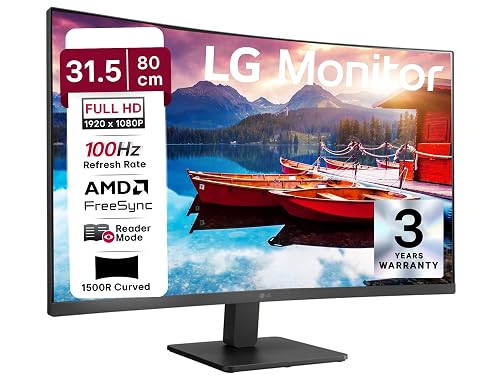
LG 32MR50C 31.5″ FHD Curved 100Hz
1800R curved VA panel, 100Hz, AMD FreeSync, flicker-safe and reader mode built in, HDMI plus DisplayPort, LG’s proven panel quality at a 32-inch budget price. The monitor that balances everything well.
LG Panel
AMD FreeSync
Reader Mode
AMD FreeSync
Reader Mode
LG’s 32-inch value proposition in 2026
LG makes excellent panels. The 32MR50C uses LG’s own VA panel, which means the contrast ratio and color depth are noticeably better than what you get from panels sourced from cheaper suppliers. The 1800R curve on a 31.5-inch screen creates an immersive feel that makes long work sessions less fatiguing because your eyes are not constantly adjusting to different focal distances across the screen.
The Reader Mode is a software feature that shifts the display to a warmer color tone and reduces brightness optimally for reading text-heavy content for extended periods. For someone who reads a lot at their desk, this is a practical daily-use feature rather than a marketing checkbox. AMD FreeSync compatibility is useful if you have an AMD GPU or integrated graphics.
Key Takeaway
The best all-around 32-inch monitor for WFH in India. LG panel quality at a price where the decision is straightforward. If you want 32 inches, a trusted brand, solid image quality, and eye care features without paying for gaming-specific features you will not use, LG 32MR50C is the answer.
Quick Comparison: All 5 LED Monitors
| Monitor | Size | Resolution | Panel | Best For | Buy |
|---|---|---|---|---|---|
| Samsung LS27D368 | 27″ | FHD 1080p | VA 100Hz | Budget curved WFH | Amazon |
| Lenovo LOQ 27Q-10 | 27″ | QHD 1440p | IPS 180Hz | QHD plus gaming | Amazon |
| Dell SE2725HM | 27″ | FHD 1080p | IPS 100Hz | Eye health, pro work | Amazon |
| Zebronics EA320 | 32″ | FHD 1080p | VA 165Hz | Budget 32″ plus speakers | Amazon |
| LG 32MR50C | 32″ | FHD 1080p | VA 100Hz | Best overall 32″ | Amazon |
Which Monitor Should You Buy
Match the monitor to your actual WFH needs:
You are upgrading from a laptop for the first time: Samsung LS27D368. Samsung quality, 27-inch curve, 100Hz, done. No overthinking needed.
You want the sharpest possible image and work with data, code, or design: Lenovo LOQ 27Q-10 with QHD. The extra resolution makes a visible difference at 27 inches.
You have eye fatigue after long sessions and need eye care features: Dell SE2725HM. The TUV-certified hardware, low blue light, and IPS panel are the combination for all-day comfort.
You want the biggest screen for the money and need built-in speakers: Zebronics EA320. 32 inches with actual usable speakers at a budget price point.
You want the best overall 32-inch from a proven brand: LG 32MR50C. LG panel quality, reader mode, AMD FreeSync, and the size that changes how you work.
Frequently Asked Questions
Is 27 inch or 32 inch better for work from home?
It depends on your desk size and how far you sit from the screen. At a standard desk, 27 inches at a 60- 70 cm viewing distance is comfortable. 32 inches works better if you sit further back or want to use the monitor as a secondary display alongside a laptop. For productivity, 32 inches gives more real estate, but at FHD resolution the pixel density is lower, and text is slightly less sharp.
Should I get a curved or flat monitor for WFH?
Curved monitors are generally better for single-monitor WFH setups because the curvature reduces eye travel distance across the screen and creates a slightly more immersive feel. For dual monitor setups, flat monitors often align better. All the curved options in this list use 1800R curvature, which is subtle and comfortable for daily use.
Is FHD or QHD better for work from home in India?
QHD at 27 inches is noticeably sharper than FHD. If you spend a lot of time reading text, writing code, or working with spreadsheets, QHD makes a real difference in comfort and visual clarity. FHD at 27 inches is still very usable and costs significantly less. For most general WFH tasks, FHD is absolutely fine and gives better value per rupee.
Does monitor refresh rate matter for work (not gaming)?
Yes, but not dramatically. Going from 60Hz to 100Hz makes scrolling, cursor movement, and window animations noticeably smoother. It reduces the visual fatigue that comes from slight screen stuttering over long sessions. Going from 100Hz to 180Hz matters mainly for gaming. For WFH, 100Hz is the practical sweet spot.
What is the best monitor for video calls and WFH meetings?
For video call heavy setups, look for monitors with built-in speakers (Zebronics EA320 is the only one in this list) or pair your monitor with a good webcam and dedicated speaker. The Dell SE2725HM is the best choice if eye comfort during long video calls is the priority. Also consider complementing your monitor with the right AI wearable tools to improve your meeting efficiency.
Final Thoughts
The best monitor for your WFH setup in India in 2026 is the one that matches your budget, desk size, and primary use case. If you are on a budget and want a trusted brand with a curved 27-inch screen, Samsung LS27D368. If you want the sharpest image and do serious work, Lenovo LOQ 27Q-10 at QHD. If eye health is the priority for long hours, Dell SE2725HM. If you want a large 32-inch screen without spending too much and need speakers, Zebronics EA320. If you want the best balanced 32-inch from a reliable brand, LG 32MR50C.
All five are available on Amazon India. Pick the one that solves your actual problem. A good monitor is one of those investments that pays off every single workday for years.
If you are building out your full WFH setup, also check our guides on the complete work from home desk setup and the best AI wearables in India to round out your productivity stack.
-

Startek Work From Home Jobs India 2026: Customer Support Blended Process (Rs 15000 to Rs 22000 Per Month)
-

Appen India 2026: Earn From Home as AI Data Annotator or Search Evaluator (Rs 800 to Rs 2500 Per Hour)
-

Teleperformance India Work From Home Jobs 2026: Chat and Voice BPO (Rs 16000 to Rs 25000 Per Month)
2025 batch hiring accenture accenture hiring accenture hiring 2024 accenture hiring 2024 batch AI AI jobs India AI news AI tools AI Training AI training jobs amazon amazon jobs amazon work from home amazon work from home job amazon work from home jobs analyst artificial intelligence bangalore BPO Jobs India career career development chatgpt coding cognizant cognizant campus hiring cognizant hiring cognizant jobs cognizant jobs for freshers cognizant off campus hiring deloitte deloitte hiring freshers deloitte hiring process digital marketing earn money online India engineers Freelance Jobs India Fresher Hiring fresher jobs fresher jobs 2026 freshers freshers hiring freshers hiring for 2025 batch freshers jobs freshers jobs India genpact genpact hiring genpact hiring process genpact interview genpact jobs genpact jobs for freshers genpact process associate google Hiring infosys infosys hiring intern interns Internships Jobs jobs for freshers laptops latest hiring machine learning mass hiring 2025 batch off campus drive off campus hiring openai oracle Process associate programming prompt engineering remote jobs Remote Jobs India remote jobs india 2026 software Developer Software engineer software engineering software engineer jobs TCS tech layoffs technology tech support WFH Jobs India wipro wipro hiring wipro hiring 2025 wipro hiring freshers wipro hiring freshers 2024 work from home work from home 2026 Work From Home India work from home India 2026 work from home job work from home jobs work from home jobs 2023 work from home jobs 2024 work from home jobs for women work from home jobs india work from home jobs no experience


Happy
0 %

Sad
0 %

Excited
0 %

Sleepy
0 %

Angry
0 %

Surprise
0 %
 0
0
 0
0

