

Best Laptops to Buy in India 2026: Top 20 Picks on Amazon from Rs 30K to Rs 2 Lakh
Read Time:26 Minute, 44 Second
Note: Laptop prices across the world are about to jump significantly. DRAM chip prices have already surged 98% in Q1 2026 driven by AI server demand eating up global chip supply. Apple hiked MacBook prices in India by up to Rs 70,000 in June 2026 because of AI memory costs, and Microsoft followed suit with price hikes across Surface devices. Industry analysts are warning that the same wave is coming for Windows laptops over the next few months as chip costs trickle down to consumer hardware.
A laptop that costs Rs 50,000 today could easily hit Rs 60,000 to 65,000 by Diwali. This is especially true for laptops with dedicated GPUs, which are seeing the sharpest price jumps because the same NVIDIA chips powering gaming are now being used for on-device AI inference, image generation, and running local LLMs. If you have been putting off buying, right now is probably the best window you will get in 2026.
Below are 20 real laptops available on Amazon India right now, across every budget from Rs 30,000 to Rs 2,00,000, picked for actual performance. Minimum processor is Intel Core i5 or AMD Ryzen 5 equivalent. Each card has features, pros, cons, and who it is best for so you can pick the right one without wasting hours scrolling.
This list covers 20 laptops available right now on Amazon India, spread across three price tiers: budget (Rs 30,000 to Rs 50,000) for students and everyday use, mid-range (Rs 50,000 to Rs 75,000) for power users and entry-level gamers, and premium (Rs 95,000 to Rs 2,00,000) for professionals and serious gamers who want the best available. Every laptop here clears the minimum bar of Intel Core i5 or AMD Ryzen 5 equivalent so you are not stepping down on performance. Laptops with a dedicated GPU are also called out for AI usage, since NVIDIA RTX cards and Apple Silicon Neural Engines are now widely used for running local AI tools, image generators, and AI coding assistants. The comparison table below gives you the full picture at a glance, and each card further down breaks down features, pros, cons, and who it is best suited for.
Quick Comparison Table
| # | Laptop | Processor | RAM / Storage | Display | GPU | Price Range | Buy |
|---|---|---|---|---|---|---|---|
| 1 | Lenovo IdeaPad Slim 3 (Ryzen 5) | Ryzen 5 7520U | 16GB / 512GB | 15.6″ FHD | Integrated | Rs 30k-35k | Buy |
| 2 | Dell Inspiron 3520 Metal (i5 12th) | i5-1235U 12th Gen | 16GB / 512GB | 15.6″ FHD 120Hz | Integrated | Rs 35k-45k | Buy |
| 3 | ASUS VivoBook 15 (i5 12th) | i5-12500H 12th Gen | 16GB / 512GB | 15.6″ FHD | Integrated | Rs 40k-45k | Buy |
| 4 | Lenovo IdeaPad Slim 3 (i5 13th, 14″) | i5-13420H 13th Gen | 16GB / 512GB | 14″ FHD IPS | Integrated | Rs 40k-45k | Buy |
| 5 | ASUS VivoBook 15 (i5 13th) | i5-13420H 13th Gen | 16GB / 512GB | 15.6″ FHD | Integrated | Rs 40k-50k | Buy |
| 6 | Dell Vostro 3520 (i5 12th) | i5-1235U 12th Gen | 8GB / 512GB | 15.6″ FHD | Integrated | Rs 40k-50k | Buy |
| 7 | HP Pavilion 15 (i5 13th) | i5-1340P 13th Gen | 16GB / 512GB | 15.6″ FHD | Integrated | Rs 50k-60k | Buy |
| 8 | HP Pavilion Plus 14 (2K IPS) | i5-1335U 13th Gen | 16GB / 512GB | 14″ WUXGA IPS | Integrated | Rs 55k-65k | Buy |
| 9 | HP Victus (i5 + RTX 3050) | i5-13420H 13th Gen | 16GB / 512GB | 15.6″ FHD 144Hz | RTX 3050 6GB | Rs 60k-65k | Buy |
| 10 | HP Victus (i5 + RTX 4050) | i5-13420H 13th Gen | 16GB / 512GB | 15.6″ FHD 144Hz | RTX 4050 6GB | Rs 65k-75k | Buy |
| 11 | Acer Nitro V 15 (i5 + RTX 4050) | i5-13420H 13th Gen | 16GB / 512GB | 15.6″ FHD 165Hz | RTX 4050 6GB | Rs 65k-75k | Buy |
| 12 | ASUS TUF A15 (Ryzen 7 + RTX 3050) | Ryzen 7 7435HS | 16GB / 512GB | 15.6″ FHD 144Hz | RTX 3050 4GB | Rs 65k-75k | Buy |
| 13 | HP Victus (Ryzen 7 + RTX 4050) | Ryzen 7 7445HS | 16GB / 512GB | 15.6″ FHD 144Hz | RTX 4050 6GB | Rs 70k-85k | Buy |
| 14 | HP Victus (i7 + RTX 4060) | i7-13620H 13th Gen | 16GB / 512GB | 15.6″ FHD 144Hz | RTX 4060 8GB | Rs 85k-95k | Buy |
| 15 | Apple MacBook Air 13″ M3 (8GB) | Apple M3 (8-core) | 8GB / 256GB | 13.6″ Liquid Retina | 10-core GPU | Rs 95k-1.1L | Buy |
| 16 | Apple MacBook Air 13″ M3 (16GB) | Apple M3 (8-core) | 16GB / 512GB | 13.6″ Liquid Retina | 10-core GPU | Rs 1.2L-1.35L | Buy |
| 17 | HP Victus (Ryzen 9 + RTX 4060) | Ryzen 9-8945HS | 16GB / 1TB | 15.6″ FHD 144Hz | RTX 4060 8GB | Rs 1.2L-1.35L | Buy |
| 18 | ASUS ROG Zephyrus G14 2024 (RTX 4060) | Ryzen 9 8945HS | 16GB / 1TB | 14″ 3K OLED 120Hz | RTX 4060 8GB | Rs 1.2L-1.4L | Buy |
| 19 | ASUS ROG G14 2024 (RTX 4060 90W) | Ryzen 9 8945HS | 16GB / 1TB | 14″ 3K OLED 120Hz | RTX 4060 90W | Rs 1.35L-1.5L | Buy |
| 20 | ASUS ROG Zephyrus G14 2025 (RTX 5070 Ti) | Ryzen AI 9 HX 370 | 32GB / 4TB | 14″ 2.8K OLED 120Hz | RTX 5070 Ti 12GB | Rs 1.8L-2L | Buy |
Budget Laptops (Rs 30,000 to Rs 50,000)
1
Lenovo IdeaPad Slim 3 Gen 8
Rs 30,000 to Rs 35,000Ryzen 5 7520U16GB RAM512GB SSD15.6″ FHD

ProcessorRyzen 5 7520U
RAM16GB LPDDR5
Storage512GB SSD
Display15.6″ FHD Anti-glare
Weight1.6 kg
OSWindows 11 + MS 365
Key Features
- AMD Ryzen 5 7520U with Radeon graphics
- 16GB RAM upgradeable to 24GB
- Backlit keyboard with fingerprint reader
- Microsoft 365 Basic included for 1 year
Pros
- Best value at under 35k
- 16GB RAM out of the box
- Thin and light at just 1.6 kg
- Good battery life
Cons
- Ryzen 7520U is a mid-range chip
- No dedicated GPU
- Average build quality at this price
Best For
- Students doing coursework
- Browsing, Office, video calls
- First-time laptop buyers
2
Dell Inspiron 3520 Metal (i5 12th Gen, 16GB)
Rs 35,000 to Rs 45,000i5-1235U16GB RAM120Hz DisplayMetal Build

Processori5-1235U 12th Gen
RAM16GB DDR4
Storage512GB SSD
Display15.6″ FHD 120Hz
Weight1.65 kg
SecurityFPR + Backlit KB
Key Features
- Metal chassis builds that feel premium
- 120Hz display is rare at this price
- Intel Iris Xe integrated graphics
- 15 months McAfee security included
Pros
- Metal build at under 45k
- 120Hz panel is a real upgrade
- Dell reliability and service network
- 16GB RAM standard
Cons
- i5-1235U is a power-efficient but not fast chip
- No dedicated GPU
- Heavier than Lenovo competitors
Best For
- Office users who want durability
- People who prefer Dell support
- Students wanting a premium feel
3
ASUS VivoBook 15 (i5-12500H 12th Gen)
Rs 40,000 to Rs 45,000i5-12500H16GB RAMH-Series Chip512GB SSD

Processori5-12500H 12th Gen
RAM16GB DDR4
Storage512GB SSD
Display15.6″ FHD 60Hz
Weight1.7 kg
OSWindows 11 + Office 2021
Key Features
- i5-12500H is a 12-core H-series chip
- Much faster than U-series at same price
- 180-degree lay-flat hinge
- Fingerprint + backlit keyboard
Pros
- H-series chip at budget price is rare
- Great for coding and multitasking
- Solid thermal management
- ASUS build quality is dependable
Cons
- Only 60Hz display
- Fans can get audible under load
- Average webcam quality
Best For
- Developers and CS students
- Heavy multitaskers on a budget
- Video editing beginners
4
Lenovo IdeaPad Slim 3 (i5-13420H, 14″)
Rs 40,000 to Rs 45,000i5-13420H16GB RAM14″ Compact13th Gen

Processori5-13420H 13th Gen
RAM16GB LPDDR5
Storage512GB SSD
Display14″ FHD IPS
Weight1.3 kg
CameraIR Camera + FPR
Key Features
- 13th Gen i5-13420H at budget price
- Ultralight 1.3 kg body
- IR camera for face unlock
- Metal top cover for durability
Pros
- 13th Gen chip at 40k is a steal
- Most portable option in this list
- IR camera is useful for quick login
- Lenovo keyboard feel is excellent
Cons
- 14″ screen can feel small for some
- No GPU for graphics tasks
- Limited port selection
Best For
- Frequent travelers and commuters
- MBA and management students
- Remote workers on the go
5
ASUS VivoBook 15 (i5-13420H 13th Gen)
Rs 40,000 to Rs 50,000i5-13420H16GB RAM15.6″ FHDOffice 2024

Processori5-13420H 13th Gen
RAM16GB DDR4
Storage512GB SSD
Display15.6″ FHD IPS
Weight1.7 kg
OfficeMS Office Home 2024
Key Features
- 13th Gen i5-13420H with Intel UHD
- MS Office Home 2024 pre-installed
- M365 Basic (1 year) included
- Backlit keyboard with fingerprint
Pros
- Newer chip than #3 at similar price
- Office 2024 saves you extra cost
- Proven ASUS reliability
- Good display brightness
Cons
- i5-13420H is power-limited vs H-series
- No dedicated GPU
- Plastic body
Best For
- Home users and students
- Small business productivity
- Online learning and video calls
6
Dell Vostro 3520 (i5-1235U, Business)
Rs 40,000 to Rs 50,000i5-1235U8GB RAMBusiness Grade512GB SSD

Processori5-1235U 12th Gen
RAM8GB DDR4
Storage512GB SSD
Display15.6″ FHD Anti-glare
Weight1.69 kg
TargetBusiness Users
Key Features
- Dell business-grade keyboard and build
- Anti-glare FHD panel
- Collaboration-ready webcam and mic
- Upgradeable RAM to 16GB
Pros
- Business reliability from Dell
- Excellent keyboard for typing
- Wide service network in India
- Good productivity performance
Cons
- Only 8GB RAM stock
- Needs a RAM upgrade to shine
- No dedicated GPU
Best For
- SMB owners and professionals
- People needing Dell business support
- Office-first productivity users
Mid-Range Laptops (Rs 50,000 to Rs 75,000)
7
HP Pavilion 15 (i5-1340P, 16GB, Audio by B&O)
Rs 50,000 to Rs 60,000i5-1340P16GB RAMB&O AudioFPR

Processori5-1340P 13th Gen
RAM16GB DDR4
Storage512GB SSD
Display15.6″ FHD Micro-Edge
AudioB&O Tuned Speakers
Weight1.74 kg
Key Features
- Intel i5-1340P with 12 cores (P-series)
- Audio tuned by Bang and Olufsen
- Micro-edge anti-glare FHD display
- Fingerprint reader on power button
Pros
- P-series chip is faster than U-series
- B&O audio makes media consumption great
- HP build quality is solid
- Good for presentations and calls
Cons
- No dedicated GPU limits creative tasks
- Heavier than ultrabooks
- Display brightness average at 250 nits
Best For
- Working professionals in mid budget
- Students who consume media regularly
- People upgrading from entry laptops
8
HP Pavilion Plus 14 (i5-1335U, 2K IPS Display)
Rs 55,000 to Rs 65,000i5-1335U16GB RAM2K WUXGA IPS5MP Camera

Processori5-1335U 13th Gen
RAM16GB LPDDR5x
Storage512GB SSD
Display14″ WUXGA IPS 300 nits
Camera5MP with IR + Shutter
Weight1.44 kg
Key Features
- 2K WUXGA IPS panel is sharp and vivid
- 5MP IR camera with privacy shutter
- Only 1.44 kg with compact 14″ chassis
- LPDDR5x RAM for fast multitasking
Pros
- 2K display is the best in this price range
- Lightweight and slim profile
- Great webcam quality for calls
- Looks premium with silver finish
Cons
- i5-1335U is not the fastest chip
- No dedicated GPU
- Battery life is average
Best For
- Content viewers who love sharp screens
- Remote workers on video calls daily
- Design students who need good display
9
HP Victus 15 (i5-13420H + RTX 3050, Entry Gaming)
Rs 60,000 to Rs 65,000i5-13420HRTX 3050 6GB144Hz16GB DDR4AI-Ready GPU
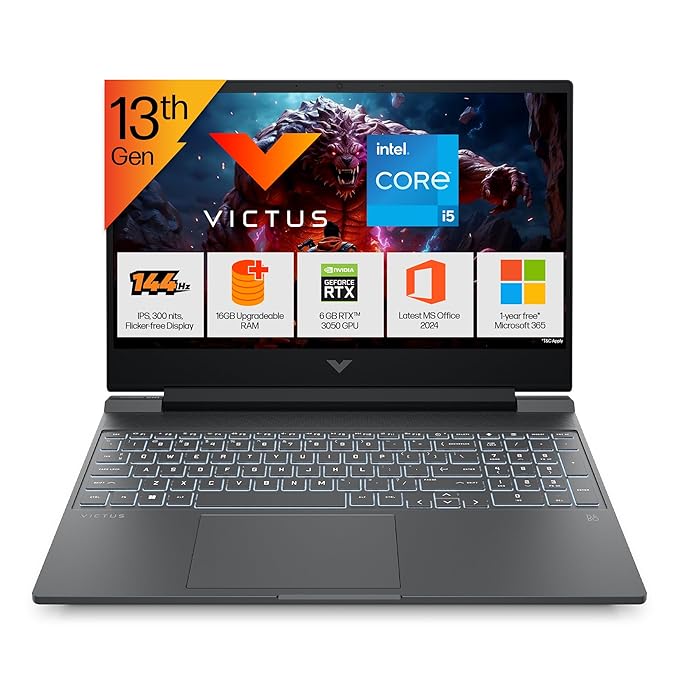
Processori5-13420H 13th Gen
GPURTX 3050 6GB VRAM
RAM16GB DDR4
Storage512GB SSD
Display15.6″ FHD 144Hz IPS
Weight2.3 kg
Key Features
- RTX 3050 with 6GB VRAM for gaming
- 144Hz display for smooth gameplay
- Enhanced dual-fan cooling system
- Xbox Game Pass included
- RTX 3050 supports CUDA for basic AI acceleration and local image gen
Pros
- Cheapest way into RTX gaming
- 144Hz is a real improvement
- Runs most games at medium-high settings
- Good thermals for HP
Cons
- RTX 3050 struggles in AAA titles
- Heavy at 2.3 kg
- Fan noise is noticeable under load
Best For
- Casual gamers on a tight budget
- Students who want some gaming ability
- PUBG, Valorant, FIFA players
- AI hobbyists exploring local Stable Diffusion and image gen tools
10
HP Victus 15 (i5-13420H + RTX 4050, Better Gaming)
Rs 65,000 to Rs 75,000i5-13420HRTX 4050 6GBAI-Ready GPU144Hz IPS16GB DDR4

Processori5-13420H 13th Gen
GPURTX 4050 6GB VRAM
RAM16GB DDR4
Storage512GB SSD
Display15.6″ FHD 144Hz IPS
DLSSDLSS 3 Support
Key Features
- RTX 4050 with DLSS 3 upscaling
- Gen 4 architecture is more efficient
- 144Hz panel for gaming and content
- Enhanced cooling with backlit keyboard
Pros
- RTX 4050 outperforms 3050 significantly
- DLSS 3 pushes frames in supported titles
- Good for Warzone, GTA V, Cyberpunk at medium
- Trusted HP service network
Cons
- Battery drains fast in gaming mode
- Gets warm under extended gaming
- 512GB storage fills up fast
Best For
- Mid-core gamers who want FPS gains
- Students who game on weekends
- Video editing and Blender beginners
- AI users running Ollama, LM Studio or local LLM tools on GPU
11
Acer Nitro V 15 (i5-13420H + RTX 4050, 165Hz)
Rs 65,000 to Rs 75,000i5-13420HRTX 4050 6GBAI-Ready GPU165Hz FHD16GB DDR5

Processori5-13420H 13th Gen
GPURTX 4050 6GB GDDR6
RAM16GB DDR5
Storage512GB Gen4 SSD
Display15.6″ FHD 165Hz IPS
Wi-FiWi-Fi 6
Key Features
- 165Hz display (highest in this price)
- Gen 4 NVMe SSD for fast load times
- DDR5 RAM for better bandwidth
- Wi-Fi 6 for low-latency online gaming
Pros
- 165Hz is smoother than 144Hz
- DDR5 + Gen4 SSD is a performance combo
- Acer gaming design looks aggressive
- Comparable to HP Victus but DDR5
Cons
- Cooling can be loud under heavy gaming
- Plastic chassis
- Battery lasts 4-5 hours max
Best For
- FPS gamers who care about Hz
- Esports players (Valorant, CS2)
- Students who want gaming plus work
- AI content creators using GPU-accelerated image generation tools
12
ASUS TUF A15 (Ryzen 7 7435HS + RTX 3050)
Rs 65,000 to Rs 75,000Ryzen 7 7435HSRTX 3050 4GB144HzMilitary GradeAI-Ready GPU

ProcessorRyzen 7 7435HS
GPURTX 3050 4GB GDDR6
RAM16GB DDR5
Storage512GB SSD
Display15.6″ FHD 144Hz
BuildMIL-STD-810H Rated
Key Features
- Military-grade MIL-STD-810H build
- Ryzen 7 7435HS is a capable 8-core chip
- ASUS TUF cooling system is excellent
- 48WHr battery with 144Hz display
Pros
- Best build durability in this price tier
- Ryzen 7 beats i5 in multi-core tasks
- TUF cooling keeps temps in check
- RGB keyboard as bonus
Cons
- RTX 3050 4GB is behind 4050 6GB
- Heavier at 2.3 kg
- Display has average color coverage
Best For
- Gamers who need durability
- Engineering and tech students
- Users who run VMs and heavy apps
- AI learners experimenting with CUDA-accelerated local AI tools
13
HP Victus (Ryzen 7 7445HS + RTX 4050)
Rs 70,000 to Rs 85,000Ryzen 7 7445HSRTX 4050 6GBDDR5 16GBAI-Ready GPU144Hz

ProcessorRyzen 7 7445HS
GPURTX 4050 6GB VRAM
RAM16GB DDR5
Storage512GB SSD
Display15.6″ FHD 144Hz IPS
ExtraXbox Gamepass Included
Key Features
- Ryzen 7 7445HS is a powerful 8-core chip
- RTX 4050 with 6GB VRAM + DLSS 3
- DDR5 RAM for better bandwidth
- Xbox Game Pass bundled
Pros
- AMD CPU + RTX combo is well balanced
- Handles streaming and gaming together
- Good price to performance for creative work
- DDR5 keeps it future-ready
Cons
- Battery life drops fast under GPU load
- Fans are loud at full blast
- Display could use better color accuracy
Best For
- Content creators who game
- Streamers on a mid budget
- Architecture and design students
- AI enthusiasts running Stable Diffusion and local AI workflows
14
HP Victus (i7-13620H + RTX 4060, 8GB VRAM)
Rs 85,000 to Rs 95,000i7-13620HRTX 4060 8GB144Hz IPS16GB DDR4AI-Ready GPU

Processori7-13620H 13th Gen
GPURTX 4060 8GB GDDR6
RAM16GB DDR4
Storage512GB SSD
Display15.6″ FHD 144Hz IPS
CoolingEnhanced Dual Fans
Key Features
- RTX 4060 with 8GB VRAM is a big step up
- i7-13620H handles video editing and compiles fast
- Runs modern AAA games at high settings
- Enhanced cooling keeps thermal throttle low
Pros
- RTX 4060 8GB is best GPU under 1L
- Solid for 3D rendering and ML workloads
- Good 1080p gaming at high settings
- HP build and after-sales support
Cons
- Only 144Hz, no 165Hz at this price
- DDR4 instead of DDR5
- Display not great for color-critical work
Best For
- Serious gamers who want real GPU power
- Video editors using Premiere or DaVinci
- Machine learning students
- AI developers and data scientists running ComfyUI and local LLMs
Premium Laptops (Rs 95,000 to Rs 2,00,000)
15
Apple MacBook Air 13″ M3 (8GB / 256GB)
Rs 95,000 to Rs 1,10,000Apple M3 ChipApple Neural Engine8GB UnifiedLiquid RetinaFanless

ChipApple M3 (8-core CPU)
GPU10-core GPU
RAM8GB Unified Memory
Storage256GB SSD
Display13.6″ Liquid Retina
BatteryUp to 18 hours
Key Features
- M3 chip is fast, efficient, and silent
- No fan, completely silent operation
- Liquid Retina display with P3 wide color
- Up to 18 hours real battery life
Pros
- Best battery life of any laptop here
- Completely silent under all loads
- Beautiful display and build quality
- macOS is smooth and stable
Cons
- 256GB fills up fast
- 8GB feels limited for heavy work
- macOS is not for everyone
- Storage is not upgradeable
Best For
- Writers, designers, and creative pros
- iPhone users wanting ecosystem sync
- Light users wanting best battery
- AI users benefiting from Apple Neural Engine and Apple Intelligence on-device features
16
Apple MacBook Air 13″ M3 (16GB / 512GB)
Rs 1,20,000 to Rs 1,35,000Apple M3Apple Neural Engine16GB Unified512GB SSDSilver

ChipApple M3 (8-core CPU)
GPU10-core GPU
RAM16GB Unified Memory
Storage512GB SSD
Display13.6″ Liquid Retina
Camera1080p FaceTime HD
Key Features
- 16GB unified memory handles heavy apps
- 512GB gives you real working storage
- M3 chip beats most Windows laptops in performance per watt
- Touch ID and 1080p webcam
Pros
- This is the sweet spot MacBook config
- Runs Final Cut, Xcode, and Figma flawlessly
- 18-hour battery is a daily driver dream
- Resale value stays high
Cons
- Still no dedicated GPU
- Not ideal for gaming
- Premium price for macOS
Best For
- Developers and UI/UX designers
- Video editors using Final Cut Pro
- Professionals who live on battery
- AI-heavy workflows using Apple Intelligence, on-device ML, and Neural Engine with 16GB unified memory
17
HP Victus AI Gaming (Ryzen 9-8945HS + RTX 4060)
Rs 1,20,000 to Rs 1,35,000Ryzen 9-8945HSRTX 4060 8GB1TB SSD144Hz IPSAI-Ready GPU

ProcessorRyzen 9-8945HS
GPURTX 4060 8GB GDDR6
RAM16GB DDR5
Storage1TB SSD
Display15.6″ FHD 144Hz IPS
AIRadeon 780M iGPU
Key Features
- Ryzen 9-8945HS is an 8-core 16-thread powerhouse
- RTX 4060 8GB handles 1080p at ultra
- 1TB SSD gives room for games and projects
- Integrated Radeon 780M for power saving
Pros
- Best CPU-GPU combo for gaming under 1.35L
- Handles GTA VI, Cyberpunk, Flight Sim well
- 1TB storage is generous
- DDR5 keeps it fast for years
Cons
- Display is still only 144Hz
- HP Victus looks are not as premium as ROG
- Loud fans at full gaming load
Best For
- Hardcore gamers who also do heavy work
- Data science students on Windows
- Streamers wanting AMD power
- AI power users running large local models and AI video generation pipelines
18
ASUS ROG Zephyrus G14 2024 (Ryzen 9 + RTX 4060, 3K OLED)
Rs 1,20,000 to Rs 1,40,000Ryzen 9 8945HSRTX 4060 8GB3K OLED 120Hz1.5 kgAI-Ready GPU

ProcessorRyzen 9 8945HS
GPURTX 4060 8GB
RAM16GB LPDDR5X
Storage1TB SSD
Display14″ 3K OLED 120Hz
Weight1.50 kg
Key Features
- 3K OLED display with 120Hz is stunning
- Only 1.5 kg for a gaming laptop
- Ryzen 9 + RTX 4060 is a powerful pairing
- AniMe Matrix LED lid is unique
Pros
- OLED display is best-in-class visuals
- Most portable gaming laptop in this list
- Handles gaming and creative work equally well
- Premium ROG build quality
Cons
- RTX 4060 is power-limited in thin chassis
- Battery heats up under sustained gaming
- Expensive for 4060 GPU
Best For
- Creative professionals who also game
- Travelers who want gaming on the go
- Anyone who wants the best display
- AI creators doing GPU-accelerated inference and generative art workflows
19
ASUS ROG Zephyrus G14 2024 (RTX 4060 90W Full Power)
Rs 1,35,000 to Rs 1,50,000Ryzen 9 8945HSRTX 4060 90W TGP3K OLED73WHr BatteryAI-Ready GPU

ProcessorRyzen 9 8945HS
GPURTX 4060 90W TGP
RAM16GB LPDDR5X
Storage1TB SSD
Display14″ 3K OLED 120Hz
Battery73WHr
Key Features
- Full 90W TGP unlocks the RTX 4060 completely
- Same G14 3K OLED but more GPU power
- 73WHr battery is large for this class
- RGB backlit keyboard with per-key lighting
Pros
- 90W TGP = actual full RTX 4060 performance
- Best gaming-to-portability ratio available
- OLED display is a delight for gaming and movies
- ROG ecosystem with Armoury Crate support
Cons
- Gets very warm at 90W sustained
- Loud fans at max performance mode
- Price premium over #18 for same GPU
Best For
- Serious gamers who want portability
- 3D artists and Blender users
- People who game at desk and travel often
- AI researchers needing sustained full-power GPU for model inference
20
ASUS ROG Zephyrus G14 2025 (Ryzen AI 9 + RTX 5070 Ti)
Rs 1,80,000 to Rs 2,00,000Ryzen AI 9 HX 370RTX 5070 Ti 12GB2.8K OLED32GB RAMAI-Ready GPU

ProcessorRyzen AI 9 HX 370
GPURTX 5070 Ti 12GB
RAM32GB LPDDR5X
Storage4TB SSD
Display14″ 2.8K OLED 120Hz
AIDLSS 4 + Frame Gen
Key Features
- RTX 5070 Ti 12GB with DLSS 4 and Frame Gen
- Ryzen AI 9 HX 370 is a 12-core powerhouse
- 32GB RAM and 4TB SSD is workstation-class
- 2.8K OLED with Dolby Vision
Pros
- Top performance in a 1.57 kg chassis
- RTX 5070 Ti handles 2K gaming at ultra
- 32GB RAM is future-proof for years
- 4TB storage for entire game library and work
Cons
- Price is at the top end of this list
- Thermal management is challenging at this power
- Overkill for most users
Best For
- Power users who need no compromise
- Game developers and 3D artists
- Professionals who need a portable workstation
- AI developers and researchers running full-size local LLMs and AI agent pipelines
This page contains affiliate links. If you buy through these links, we may earn a small commission at no extra cost to you. All recommendations are based on real specs and honest research.
Which Laptop Should You Actually Buy
If your budget is under Rs 40,000, go with the Lenovo IdeaPad Slim 3 with Ryzen 5 7520U. It gets you 16GB RAM and a solid chip for everyday tasks without breaking the bank. If you need just a bit more power without spending more, the ASUS VivoBook 15 with i5-12500H at #3 is worth the stretch.
Between Rs 55,000 and Rs 75,000, the HP Victus with i5-13420H and RTX 4050 at #10 is the best value. You get a 4th-gen GPU, 144Hz display, and a chip that handles both work and light gaming. The Acer Nitro V at #11 is a close second if you prefer 165Hz and DDR5 memory.
For Rs 85,000 to Rs 1,00,000, the HP Victus with RTX 4060 8GB at #14 gives you the most GPU power under the 1 lakh mark. It is the only laptop in that budget with a proper 8GB VRAM card that can run modern games at high settings.
If you are on macOS and want the best laptop experience for non-gaming work, the MacBook Air M3 16GB/512GB at #16 is the answer. Nothing at its price comes close for battery life, display quality, and silent operation.
For the ultimate portable gaming machine, the ASUS ROG Zephyrus G14 2025 with RTX 5070 Ti at #20 is in a class of its own. It is expensive. But it is also genuinely the best 14-inch gaming laptop available in India right now.
Which one are you planning to buy? Drop the number in the comments and tell me what you will use it for.
Frequently Asked Questions
What is the minimum processor I should look for in a laptop in 2026?
At minimum, go for Intel Core i5 12th Gen or AMD Ryzen 5 5500U or newer. Anything older or a budget Celeron or Pentium will bottleneck your workflow quickly. The i5-13420H and Ryzen 5 7520U are excellent entry points for a laptop you plan to use for 3 to 4 years.
Is 8GB RAM enough for a laptop in 2026?
For basic browsing and Office use, yes. But if you plan to code, edit videos, run multiple Chrome tabs, or do any creative work, 16GB is now the minimum you should target. All the top picks in this list come with at least 16GB out of the box.
Should I buy a gaming laptop or a regular laptop for college?
If you will use it for engineering, coding, or heavy multitasking, a gaming laptop like the Acer Nitro V or HP Victus gives you a faster processor, better thermals, and a 144Hz display for around Rs 65,000 to Rs 75,000. For regular coursework and presentations, a mid-range laptop like the HP Pavilion or Lenovo IdeaPad is lighter and more battery-efficient.
Is the MacBook Air M3 worth buying in India in 2026?
Yes, if your workflow is in the Apple ecosystem and you do not need a dedicated GPU. The M3 chip outperforms most Windows laptops in single-core speed, offers 18 hours of real battery life, and comes in a fanless silent design. The 16GB/512GB model is the sweet spot and holds its resale value better than most Windows competitors.
What is the best gaming laptop under Rs 75,000 in India?
The Acer Nitro V 15 with i5-13420H and RTX 4050 6GB VRAM at Rs 65,000 to Rs 75,000 is the best gaming laptop under 75k right now. It comes with 165Hz display, DDR5 RAM, Gen4 SSD, and Wi-Fi 6. Alternatively, the ASUS TUF A15 with Ryzen 7 and RTX 3050 is a more durable choice in the same range if build quality matters more to you than raw GPU power.


Happy
100 %

Sad
0 %

Excited
0 %

Sleepy
0 %

Angry
0 %

Surprise
0 %
 0
0
 0
0

